Volkswagen Golf Service & Repair Manual: Removing and installing bulb for number plate light -X4-/-X5-
 Note Note
| If an LED number plate light is faulty, the entire number
plate light must be renewed. |
| – |
Switch off ignition and all electrical consumers. |
| – |
If ignition key is present, disengage in position 0
(locked). |
| – |
Remove number plate light
→ Chapter. |
|
|
|
| – |
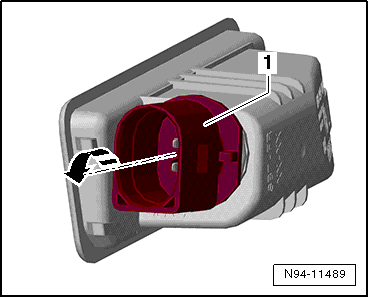
Turn bulb holder -1- in
-direction of arrow- to unlock,
then pull it out of number plate light. |
| Install in the reverse order of removal, observing the
following: |
|
|
|
Note
If an LED number plate light is faulty, the entire number
plate light must be renewed.
Removing
– ...
Other materials:
Removing and installing wheel bearing housing
Special tools and workshop equipment required
Ball joint puller -3287A-
Spreader -3424-
Ball joint puller -T10187-
Torque wrench -V.A.G 1332-
Engine and gearbox jack -V.A.G 1383 A-
Angl ...
Stowage compartment in the front centre console
Fig. 111 In the centre console: stowage
compartment
First read and observe the introductory information
and safety warnings To open, briefly press the cover of the stowage
compartment (arrow).
To close, push the stowage compartment cover down as far as it will go.
The stowage co ...
Run-flat tyre system PAX, checking support ring
As with tyres, the support ring does not always need to be
renewed after driving with a flat tyre.
If the following damage can be observed, renew the support
ring:
Broken par ...
© 2016-2026 Copyright www.vwgolf.org


 Removing and installing number plate light -X4-/-X5-