Volkswagen Golf Service & Repair Manual: Special connector systems
 Note Note
| If necessary, any housing catches in place (secondary
locking mechanisms) must be released or removed prior to
disengaging the contacts using the prescribed tool
→ Chapter. |
|
|
|
| – |
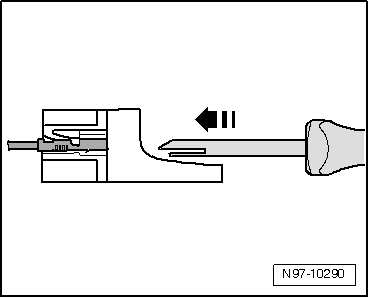
Insert the release tool appropriate for the contact housing
in the release port of the contact housing. |
| – |
Grab hold of the contact by the wire and push it lightly
into the contact housing. |
Note
| By pushing the contact in the direction of the contact
housing, the locking tabs of the contact are lifted up by the
housing edge and disengaged using the release tool. |
|
|
|
| – |
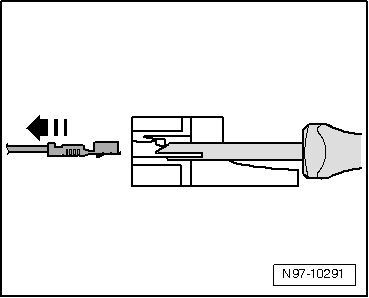
At the same time, push the release tool in the direction of
the contact housing and pull out the released contact from the
contact housing -arrow-. |
| – |
The release tool can be pulled out of the contact housing
again once the contact has been removed. |
|
|
|
| – |
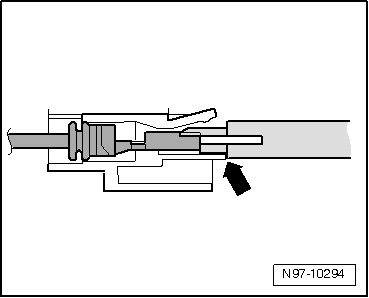
Insert the release tool appropriate for the contact housing
under the locking tab into the contact housing. |
| – |
Push the tool onto the limit stop
-arrow- in the contact housing. |
|
|
|
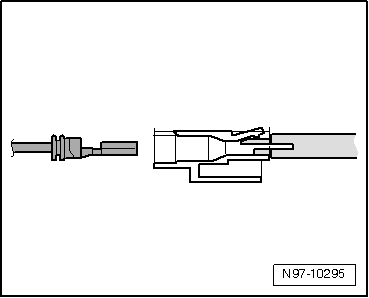
| The contact is ejected from the contact housing. |
| – |
The release tool can be pulled out of the contact housing
again once the contact has been ejected. |
|
|
|
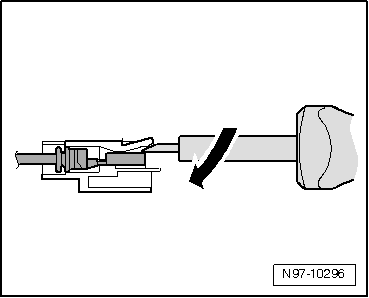
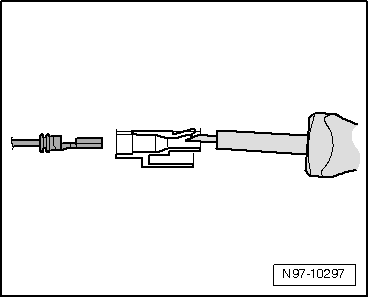
| Contacts without locking tabs: |
| – |
Insert the release tool under the locking tab of the contact
housing. |
| – |
Push through the release tool with a light upward movement
-arrow- onto the limit stop. |
|
|
|
| The contact is ejected from the contact housing. |
|
|
|
Note
If necessary, any housing catches in place (secondary
locking mechanisms) must be released or removed prior to
disengaging the contacts using the ...
Using contact surface cleaning set -VAS 6410-
The contact surface cleaning set -VAS 6410- allows optimal
repair quality to be achieved in the area of vehicle electrics.
...
Other materials:
Checking valve guides
Special tools and workshop equipment
required
Universal dial gauge bracket -VW 387-
Dial gauge -VAS 6079-
...
Introduction
This chapter contains information on the following subjects:
→ Technical requirements
→ Mechanically positioned ball coupling
→ Fitting a bicycle carrier on the mechanically positioned ball coupling
→ Hitching and connecting the trailer
...
Assembly overview - rear brake caliper
When carrying out repairs, install all parts supplied in
repair kit.
Use only methylated spirits for cleaning the brake.
New brake calipers are filled with brake fluid and are
pre-bled.
...
© 2016-2026 Copyright www.vwgolf.org


 Flat connector systems
 Contact surface cleaning set -VAS 6410-