Volkswagen Golf Service & Repair Manual: Removing and installing short centre underbody cover

Note
| The removal and installation procedures may have to be modified
slightly depending on engine fitted. |
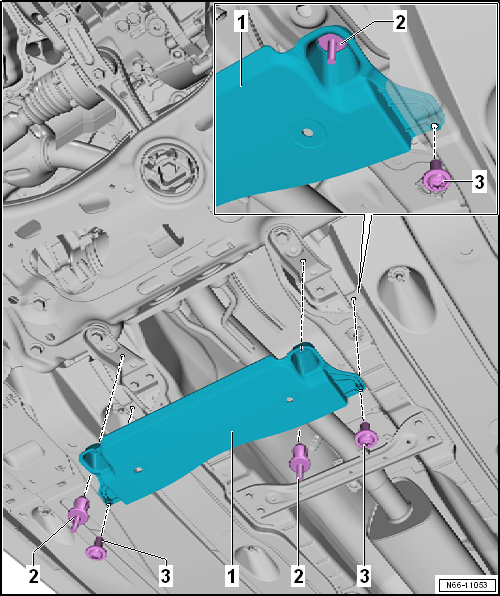
| Unclip spreader river -2- and remove
centre underbody panels. |
| Installation is carried out in reverse order. |
Note
The removal and installation procedures may have to be modified
slightly depending on engine fitted.
Removing
Unclip spreader river -2- and remove
...
Removing
–
Remove bolts -2-.
–
Unscrew nuts -3-.
–
Remove underbody cover -1-.
Installing
...
Other materials:
Subsequent bleeding of hydraulic system
Note
Carry out subsequent bleeding when:
brake pedal travel is too long or so-called
»soft brake pedal«
Subsequent bleeding requires the assistance of a second
mechanic.
–&n ...
Assembly overview - sun visors
Note
The assembly overview is shown for the driver side. The assembly
overview for the front passenger side is analogous.
1 -
Sun visor
Removing and installing
→ Chapter
2 -
Sun visor mount
...
Removing and installing TV tuner, Golf
Special tools and workshop equipment
required
Protective cap for wiring harness connector -VAS 6223/9-
If the control unit is replaced, select the
Replace function of the resp ...
© 2016-2026 Copyright www.vwgolf.org


 Removing and installing centre underbody covers
 Removing and installing centre underbody cover – e-Golf