Volkswagen Golf Service & Repair Manual: Front camera for assist systems
| Removing and installing front camera for
driver assist systems |
| – |
Switch off ignition and all electrical consumers. |
| – |
If ignition key is present, disengage in position 0
(locked). |
|
|
|
| – |
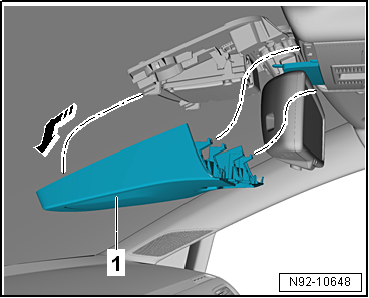
Remove cover -1-
→ General body repairs, interior; Rep. gr.68. |
|
|
|
| – |
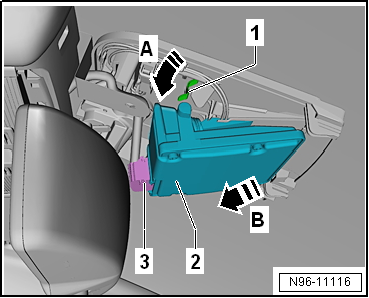
Unclip retaining clips -1- for
front camera for driver assist systems -R242--2-
in direction of arrow -A-. |
| – |
Pull front camera for driver assist systems -R242--1-
in direction of arrow -B- out of
mounting. |
| – |
Disconnect electrical connector -3-. |
| Install in the reverse order of removal, observing the
following: |
| – |
Calibrating front camera for driver assist systems -R242-
→ Running gear, axles, steering; Rep. gr.44. |
|
|
|
Special tools and workshop equipment
required
Removal wedge -3409-
Removing
...
Removing and installing cigarette lighter
-U1-
Note
All instructions and notes regarding this chapter are
available under
...
© 2016-2026 Copyright www.vwgolf.org


 Removing and installing anti-theft alarm sensor -G578-, version with 4 bolts
 Cigarette lighter, socket