Volkswagen Golf Service & Repair Manual: Removing and installing anti-theft alarm sensor -G578-, version with 4 bolts
| Special tools and workshop equipment
required |
|
|
|
 Caution
| Danger of damage to component surfaces. |
| When using leverage tools, mask visible areas of the
component with commercially available adhesive tape. |
|
| – |
Remove front interior light -WX1-
→ Chapter. |
|
|
|
| – |
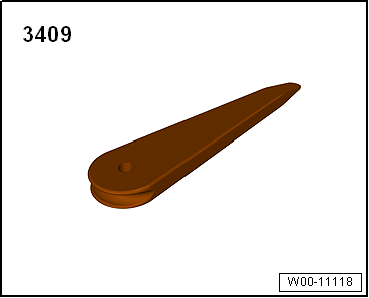
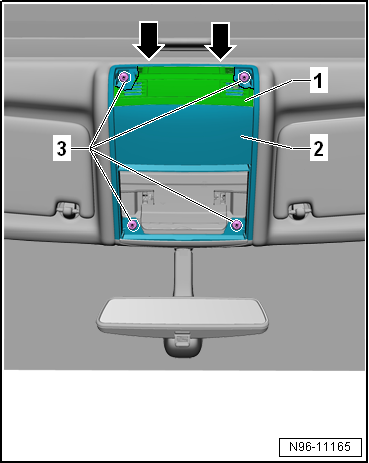
Using removal wedge -3409-, lever off cover
-1- in vicinity of
-arrows-. |
| – |
Remove roof module -2-. |
| – |
Disconnect electrical connector. |
|
|
|
| – |
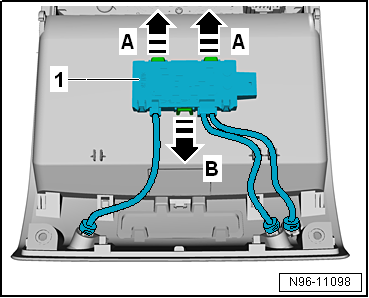
Release retaining tabs in direction of arrows
-A- and -B-. |
| – |
Remove anti-theft alarm sensor -G578--1-
from roof module. |
|
|
|
| – |
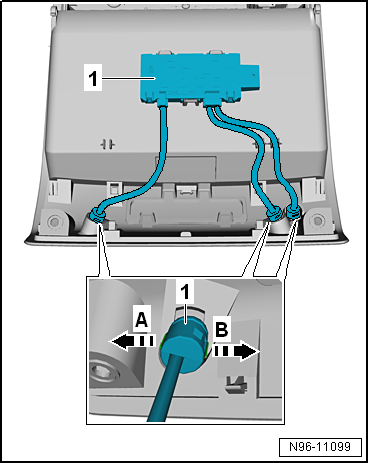
Release retaining tabs in direction of arrows
-A- and -B-. |
| – |
Remove single sensor -1- from
roof module. |
| Install in the reverse order of removal, observing the
following: |
 Note Note
| The anti-theft alarm sensor -G578- needs to be parameterised
after renewal. |
| – |
Parameterise anti-theft alarm system sensor -G578-
→ Vehicle diagnostic tester. |
| → Chapter „Assembly overview - interior monitor“ |
|
|
|
Removing
–
Remove front interior light -WX1-
→ Chapter.
–&n ...
Removing and installing front camera for
driver assist systems
Removing
–
Switch off ignition and all electrical ...
© 2016-2026 Copyright www.vwgolf.org


 Removing and installing anti-theft alarm sensor -G578-, version with 2 bolts
 Front camera for assist systems