
Volkswagen Golf Service & Repair Manual: Removing and installing bonnet release lever
|
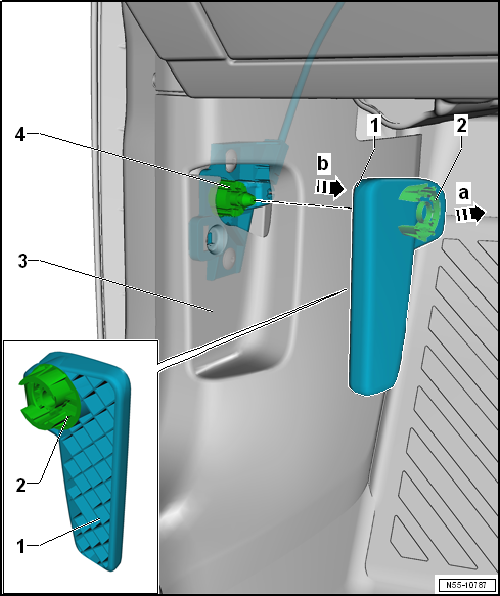
| – | Tighten release lever -1- and unlock bonnet. |
| – | Insert a small screwdriver in gap between release lever -1- and retaining clip -2-. |
| – | Lever retaining clip -2- out of release lever -1--arrow b- and pull release lever off mounting bracket -3--arrow a-. |
| For further work on mounting bracket -3-, A-pillar lower trim -4- must be removed → General body repairs, interior; Rep. gr.70. |
|
| l | Lower A-pillar trim -3- is installed. |
| – | Push retaining clip -2- into release lever -1-. |
| – | Press retaining lever -1- onto mounting bracket -4-. |
| – | Before closing bonnet, check function of release lever and cable. |
 Removing and installing bonnet lock, RHD vehicle
Special tools and workshop equipment
required
Torque wrench -V.A.G 1331-
...
 Removing and installing striker pin
Special tools and workshop equipment
required
Removing
Torque wre ...
Other materials:
Removing and installing rear side airbag crash sensor -G256-/-G257-
Removing
WARNING
Observe safety instructions for
pyrotechnic components → Chapter.
...
Performing battery test with Midtronics -MCR340V- battery tester
Prerequisites:
WARNING
Before working on the battery, read through the
warning and safety regulations carefully, and comply
with them
→ Chapter.
...
Preparatory measures for calibration
Extensive preliminary work is required before the actual
calibration can be carried out using → Vehicle
diagnostic tester.
Prerequisites:
Position vehicle on a firm and level surface.
...
