
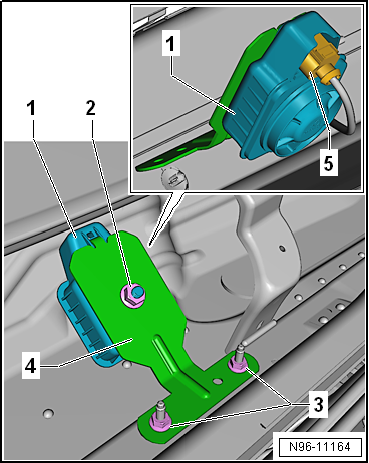
Volkswagen Golf Service & Repair Manual: Removing and installing alarm horn -H12-
|
|
|
 Assembly overview - interior monitoring, RHD vehicles
1 -
Button for deactivating interior monitoring and vehicle inclination
sensor -E616-
Removing and installing
→ Chapter
2&nb ...
 Removing and installing anti-theft alarm sensor -G578-, version with 2 bolts
Removing
–
Remove front interior light -WX1-
→ Chapter.
–&n ...
Other materials:
Removing and installing water drain hoses
Note
In models for “NAR” market, the left rear water drain hose ends
in the left wheel housing.
Removing front water drain hose
–
Remove A-pillar trim
→ General body repairs, interior; Rep. gr.70.
...
Removing and installing left temperature flap control motor -V158-, LHD
vehicles
Special tools and workshop equipment
required
Vehicle diagnostic tester
First carry out the following work:
–
Switch off all electrical consumers.
–
...
Removing and installing auxiliary air heater element -Z35- with auxiliary
air heater control unit -J604-, LHD vehicles
Removing
–
Remove driver side knee airbag
→ General body repairs, interior; Rep. gr.69.
–
Remove left centre console trim in footwell
→ General body repairs, interior ...
