
Volkswagen Golf Owners Manual: Locking and unlocking the driver door manually
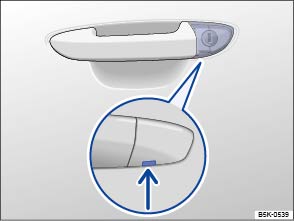
Fig. 209 Door handle on the driver door: covered lock cylinder
 First read and observe the introductory information
and safety warnings
First read and observe the introductory information
and safety warningsIf locked manually, all doors are locked. If unlocked manually, only the driver door is unlocked. Observe information on the anti-theft alarm .
- Fold the key bit out of the vehicle key.
- Insert the key bit into the opening for the cover on the driver door handle (arrow) from below. Lift up the cover. If necessary pull the door handle.
- Insert the key bit into the lock cylinder and lock or unlock the vehicle.
Things to note when unlocking:
- The anti-theft alarm stays active when the vehicle is unlocked. However, the alarm will not be triggered.
- Open the driver door. This will trigger the alarm.
- Switch on the ignition. When the ignition is switched on, the electronic immobilizer detects a valid vehicle key and deactivates the anti-theft alarm system.

The anti-theft alarm is not activated when the vehicle is locked manually using the key bit .
 Introduction
This chapter contains information on the following subjects:
→ Locking and unlocking the driver door manually
→ Locking the front passenger door and rear doors manually
→ U ...
 Locking the front passenger door and rear doors manually
Fig. 210 In the end face of the right-hand
door: manual lock covered by a rubber seal
Fig. 211 Manually locking the vehicle with
the vehicle key
First read and observe the introductory informa ...
Other materials:
Assembly overview - gas discharge headlight with dynamic high beam control
and LED daytime running light
1 -
Headlight
Removing and installing
→ Chapter
2 -
Front turn signal bulb
Front left turn signal bulb -M5-
Front right turn signal bulb -M7-
Removing and installi ...
Safety precautions when working on ignition system
Risk of injury due to electric shock
The ignition system is under high-voltage when the engine is
running. Touching the ignition system may result in an electric shock.
–
Do not touch or disconnect ignition cables when the engine is
running or bei ...
Adjusting clutch engagement
The position of the engagement bearings “K 1” and “K 2” must
only be adjusted after the following work:
Clutch has been renewed.
Engaging levers were renewed.
Small ba ...
