
Volkswagen Golf Owners Manual: Centre cover
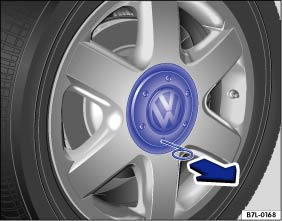
Fig. 218 Removing the centre covers by pulling

Fig. 219 Removing the centre covers by turning
 First read and observe the introductory information
and safety warnings
First read and observe the introductory information
and safety warningsThe centre cover can be removed by pulling or turning , depending on the design.
Vehicles with centre covers that can be removed by pulling
- To remove, take the wire hook from the vehicle toolkit and insert it into a hole in the cover .
- Remove the cover in the direction of the arrow.
- To replace: press the centre cover against the rim until you feel it engage.
Vehicles with centre covers that can be removed by turning
- To remove turn the centre covers clockwise or anticlockwise until they are released from the rim .
- Reach behind one of the bars and remove the centre cover.
- To replace, place the centre cover in the middle of the rim.
- Press the centre cover against the rim until you feel it engage.
 Introduction
This chapter contains information on the following subjects:
→ Centre cover
→ Wheel cover
→ Wheel bolt caps
Additional information and warnings:
Cleaning and caring f ...
 Wheel cover
Fig. 220 Removing the wheel covers
First read and observe the introductory information
and safety warningsRemoving the wheel covers
Take the box spanner and wire hook from the vehicle toolkit. ...
Other materials:
Starter button
Fig. 129 In the lower part of the centre
console: starter button for the Keyless Access locking and starting system
Fig. 130 Emergency start function in vehicles
with Keyless Access
First read and observe the introductory information
and safety warnings The starter button can only be ope ...
Battery tester with printer -VAS 6161-
General description:
WARNING
Danger of injury! Observe warning notices and safety
regulations
→ Chapter!
It is not necessary to remove or ...
Safety precautions when working on high-voltage system
Danger to life due to high voltage
The high-voltage system is under high voltage. There is a risk of
severe or fatal injury due to electric shock.
–
Persons with life-preserving or other electronic medical devices in
or on their body must not perf ...
