
Volkswagen Golf Service & Repair Manual: Removing and installing rear underbody cover – e-Golf
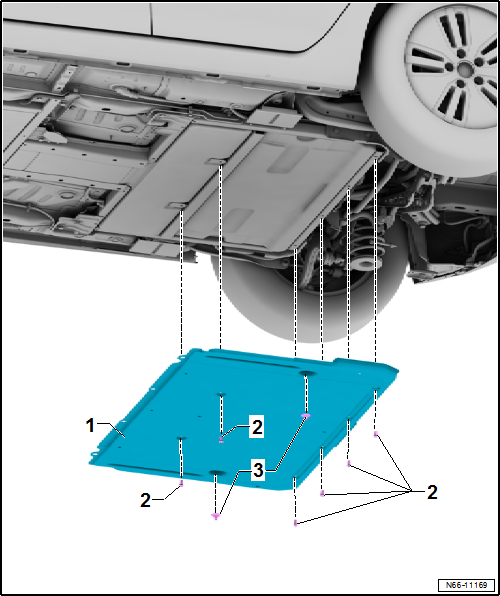
| Removing |
| – | Remove bolts -2-. |
| – | Unscrew nuts -3-. |
| – | Remove underbody cover -1-. |
| Installing |
| Install analogously in reverse order, but note the following: |
| Specified torque |
| Bolts → Item |
| Nuts → Item |
 Removing and installing rear underbody cover – petrol/diesel
Note
The removal and installation procedures may have to be modified
slightly depending on engine fitted.
–
Loosen lock washer -3-.
†...
 Removing and installing front tunnel cross-piece
Special tools and workshop equipment
required
Torque wrench -V.A.G 1331-
...
Other materials:
Assembly overview - driver side dash panel cover
1 -
Bolt
1.5 Nm
2 -
Bolt
1.5 Nm
3 -
Driver side dash panel cover
Removing and installing
→ Chapter
4 -
Bolt
Qty. 2
1.5 Nm
5& ...
Fixing position of subframe, multi-link suspension, four-wheel drive
Special tools and workshop equipment
required
Locating pins -T10096-
Engine and gearbox jack -V.A.G 1383 A-
...
Fixing position of subframe, multi-link suspension, front-wheel drive,
except for e-Golf and Golf GTE
Special tools and workshop equipment
required
Locating pins -T10096-
Engine and gearbox jack -V.A.G 1383 A-
...
