Volkswagen Golf Service & Repair Manual: Removing and installing net partition mounting
| – |
Remove net partition
→ Chapter. |
| – |
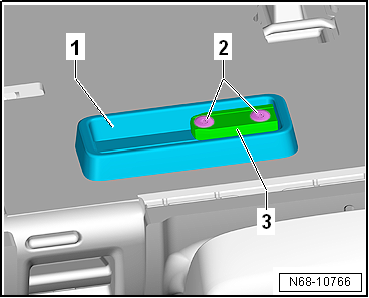
Remove insert -3- and mounting
-1- from right rear seat backrest
(2/3). |
|
|
|
| Install in reverse order, but note the following: |
 Note Note
| |
Note installation position of insert
-1- and mounting -2-. |
| |
Secure mounting -2- in left
threaded holes. |
| |
Fit locating lug on insert -1-
into recess in mounting -2-. |
| |
Clean remnants of locking fluid from thread with a wire
brush. Then, fit bolts using locking fluid (
→ Electronic Parts Catalogue ). |
| |
Also clean locking fluid from threaded holes (e.g. using
thread chaser). |
| |
→ Chapter „Assembly overview- net partition“ |
|
|
Removing
–
Fold down both rear seat backrests.
–
Pull net partition -1- towards
right out of mount ...
Removing
–
Remove luggage compartment side trim
→ Chapter.
–
Pull belt webbing aside, a ...
Other materials:
Declaration of conformity
First read and observe the introductory information
and safety warnings The individual manufacturer declares herewith that the
following products conform, at the time of vehicle production, with the basic requirements
and other relevant laws and regulations, including FCC Part 15.19, FCC Par ...
Operation
First read and observe the introductory information
and safety warnings The traffic sign recognition system is supported in various
countries . Please remember this when travelling abroad.
Display of traffic signs
Speed limit signs and no-overtaking signs with accompanying additional si ...
Permissible deviation in tread depth
Only tyres of the same construction and tread pattern should
be used on all four wheels.
Always fit the tyres with the deeper tread to the front
axle.
It is basically possible to replace tyres individually.
...
© 2016-2026 Copyright www.vwgolf.org


 Removing and installing net partition
 Removing and installing bracket for net partition