Volkswagen Golf Service & Repair Manual: Layout - infotainment system, Composition Media and Discover Media version
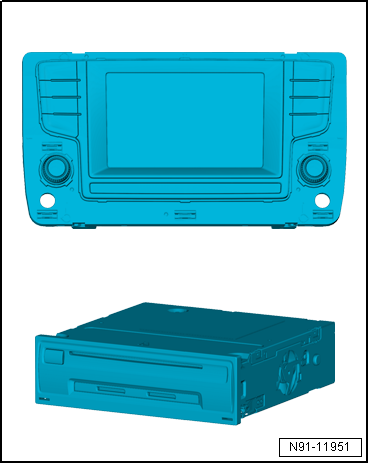
| Control unit 1 for information electronics -J794- |
| Display unit for control device of front display and
information control panel -J685- |
| SD memory card reader: Discover Media with 2 SD card slots,
Composition Media with 1 SD card slot |
| Connection for external multimedia devices |
| Features of infotainment system Composition Media |
| 5.8-inch multicolour touch screen (approach detection) |
| Integrated DAB tuner for digital radio reception |
| SDARS for vehicles in North America and Canada |
| Integrated diversity function |
| SD memory card reader with 1 SD card slot |
| AUX IN via jack connector |
| Support for multifunction steering wheel |
| Self-diagnosis, including loudspeaker diagnosis |
| Bluetooth hands-free system |
| Speed dependent volume control (GALA) |
| Speed dependent dynamic compression (GADK) |
| Features of infotainment system Discover Media |
| Additional features of infotainment system Composition Media |
| Navigation system with GPS satellite receiver |
| SD memory card reader with 2 SD card slots |
 Note Note
| When dealing with complaints it is absolutely necessary to
understand the functions and operation of the infotainment
system. |
| Additional information can be found in the
→ Operating manual. |
| Other systems in the vehicle are connected via CAN bus
(infotainment) and data bus diagnostic interface -J533-. |
| Fault finding is done via Guided fault
finding
→ Vehicle diagnostic tester. |
|
|
|
| Infotainment system overview |
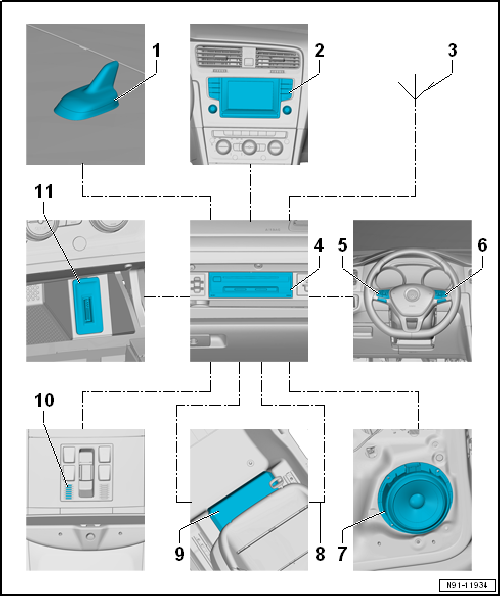
| 2 - |
Display unit for control device of front display and information
control panel -J685- |
| 4 - |
Control unit 1 for information electronics -J794- |
| 5 - |
Multifunction buttons on left in steering wheel -E440- |
| 6 - |
Multifunction buttons on right in steering wheel -E441- |
| 9 - |
Digital sound package control unit -J525- |
| 10 - |
Microphone unit in front roof module -R164- |
| Telephone microphone -R38- |
| 11 - |
Connection for external multimedia devices |
| Apart from the CAN bus, the optical data bus “MOST bus” is
used. |
| Optical fibre conductors are used as “connecting cables”.
For protection purposes, optical fibre conductors are run
through corrugated pipes. |
| As far as possible, renew the complete optical fibre
conductor. |
| Make sure that the cross-cut ends of connectors are not
dirty. |
|
|
|
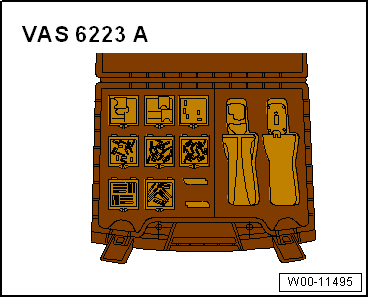
| If connectors are separated, attach protective cap for
cable-set connector -VAS 6223/9-. |
| When routing the optical fibre conductor, make sure that the
minimum bending radius of 25 mm is observed. Optical fibre
conductors must not be kinked or pinched. |
| Optical fibre conductors
→ Electrical System, General Information; Rep. gr.97 |
|
|
|
Display unit for control device of front display and
information control panel -J685-
Optional
CD drive
...
Control unit 1 for information electronics -J794-
Display unit for control device of front display and
information control panel -J685-
...
Other materials:
Vibration, causes for vibration
Vibration can have a number of different causes. Vibration
can also be caused by tyre wear. Tyre wear caused by driving is
not always evenly spread across the entire running surface of
the tyre. This causes slight imbalances which affect the smooth
runni ...
Description of battery charger -VAS 5903-
The battery charger -VAS 5903- is suitable for charging all
12V batteries supplied by Volkswagen.
Battery charger -VAS 5903-
1 -
Display
2 -&n ...
Removing and installing front tunnel cross-piece
Special tools and workshop equipment
required
Torque wrench -V.A.G 1331-
Removing
–
If fitted, remove centre underbody panel
→ ...
© 2016-2026 Copyright www.vwgolf.org


 Layout - infotainment system, Composition Touch and Composition Colour
version
Layout - infotainment system, Composition Touch and Composition Colour
version Layout - infotainment system, Discover Pro version