
Volkswagen Golf Owners Manual: Interior mirror
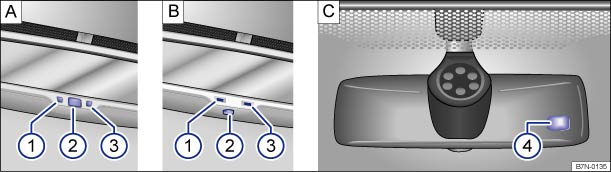
Fig. 92 On the windscreen: automatic anti-dazzle interior mirror
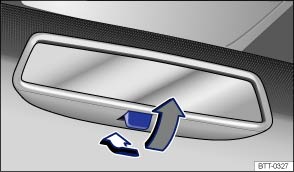
Fig. 93 On the windscreen: manual anti-dazzle interior mirror
 First read and observe the introductory information
and safety warnings
First read and observe the introductory information
and safety warnings The driver must adjust the interior mirror to ensure clear visibility through the rear window.
The driver’s rear view may be restricted or completely obscured by objects such as a sunblind on the rear window, items of clothing stowed on the luggage compartment cover, or a rear window that is covered in ice, snow or dirt.
Automatic anti-dazzle interior mirror
Key for :
 Indicator lamp.
  Switch.
  Sensor for determining light incidence
from the rear.
Sensor for determining light incidence
from the rear.  Sensor for determining light incidence
from the front.
Sensor for determining light incidence
from the front.
The automatic anti-dazzle function is switched on and off using the switch in the interior mirror A ② or B ②. The indicator lamp A ① or B ① will light up when the automatic anti-dazzle function is switched on.
There are two sensors in the interior mirror housing:
- One sensor on the side facing the interior to measure light incidence from the rear A ③ or B ③.
- One sensor on the side facing the windscreen to measure light incidence from the front C ④.
When the ignition is switched on, the interior mirror will darken automatically according to the amount of light it receives.
If the light on the sensors is hindered or interrupted, e.g. by a sunblind, the automatic anti-dazzle interior mirror will not function or will not function correctly.
The automatic anti-dazzle function is deactivated when reverse gear is engaged or if an interior or reading light is switched on.
Do not attach external navigation devices to the windscreen or near interior automatic anti-dazzle mirrors .
Manual anti-dazzle interior mirror
- Basic position: the lever on the lower part of the mirror is pointing towards the windscreen.
- Pull the lever to the back to select the anti-dazzle function .

 WARNING
- Impairments of the automatic anti-dazzle function may mean that the interior mirror cannot be used to precisely determine the distance from vehicles travelling behind or from other objects.
 Introduction
This chapter contains information on the following subjects:
→ Interior mirror
→ Exterior mirrors
For safety reasons it is important that the driver positions the exterior ...
 Exterior mirrors
Fig. 94 In the driver door: rotary knob
for the exterior mirrors
First read and observe the introductory information
and safety warnings
When the ignition is switched ...
Other materials:
Removing and installing cylinder head
Special tools and workshop equipment
required
Socket -3410-
Removing
Note
Fit all heat shield sleeves in the same place when
installing. ...
Factors influencing the service life of tyres
The following factors influence a tyre's service life to
varying degrees.
Driving style:
Speed
Braking
Acceleration
Cornering
...
Removing and installing Denso heat exchanger, LHD vehicles
Special tools and workshop equipment
required
Drip tray for workshop hoist -VAS 6208-
Hose clamps up to 25 mm -3094-
...
