
Volkswagen Golf Owners Manual: Windscreen wiper lever
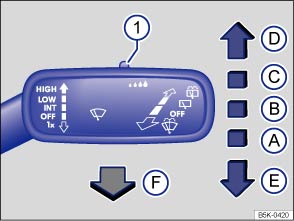
Fig. 86 Operating the front windscreen wiper
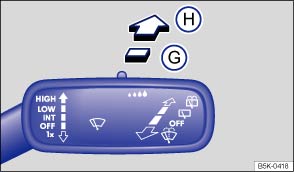
Fig. 87 Operating the rear window wiper
 First read and observe the introductory information
and safety warnings
First read and observe the introductory information
and safety warnings | Move the lever into the required position : | ||
|---|---|---|
| Ⓐ |
 
|
Switches off the windscreen wiper. |
| Ⓑ |
 
 |
Interval wipe for the windscreen. |
| Ⓒ |

 |
Slow wipe. |
| Ⓓ |

 |
Fast wipe. |
| Ⓔ |
 x x |
Flick wipe – wipes briefly. Push and hold the lever down for longer to wipe more quickly. |
| Ⓕ |
 |
Pulling the lever activates the wash and wipe system for cleaning the windscreen. |
| Ⓖ |
 |
Interval wipe for the rear window. The windscreen wiper will wipe the window approximately every 6 seconds. |
| Ⓗ |
 |
Pushing the lever activates the wash and wipe system for cleaning the rear window. |
| ① |
 |
Set the interval lengths with the switch (vehicles without rain sensor) or adjust the sensitivity of the rain sensor. |

 NOTICE
- Remove any snow and ice from the wipers before setting off.
- Carefully detach wiper blades that have become frozen onto the windscreen. Volkswagen recommends using a de-icer spray for this.
NOTICE


 button and the
  and
Mirror and wipers function buttons in the infotainment system .
and
Mirror and wipers function buttons in the infotainment system . Indicator lamp
First read and observe the introductory information
and safety warnings
Lit up
Possible cause
Solution
Windscreen washer fluid leve ...
 Windscreen wiper functions
First read and observe the introductory information
and safety warnings
Windscreen wiper response in various situations:
When the vehicle
is station ...
Other materials:
Dimensions – “e-Golf” lettering on rear lid
Note
When fitting the lettering, observe the fitting notes
→ Anchor.
1 -
Lettering
Model designation
2 -
Height dimension
75.5 ± 1 mm, from lower edge of lettering to tail light
3& ...
Electronic immobilizer
First read and observe the introductory information
and safety warnings The immobilizer helps to prevent the engine from being
started and driven with an unauthorised vehicle key.
There is a chip in the key. It automatically deactivates the immobilizer when
the vehicle key is inserted into ...
Removing and installing headlight range control regulator -E102-
Note
The removal and installation procedures are described for
LHD vehicles. Removal and installation for RHD vehicles are
similar.
Removing
–
Remove rotary light switch -EX1-
→&n ...
