
Volkswagen Golf Owners Manual: Stowage compartment in the front centre console
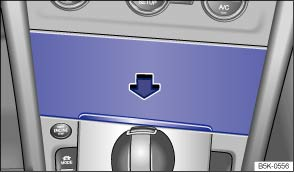
Fig. 111 In the centre console: stowage compartment
 First read and observe the introductory information
and safety warnings
First read and observe the introductory information
and safety warnings To open, briefly press the cover of the stowage compartment (arrow).
To close, push the stowage compartment cover down as far as it will go.

The stowage compartment may contain the factory-fitted USB socket
 , the AUX-IN socket
 or the multimedia socket (MEDIA-IN) ⇒ BookletRadio,
or ⇒ BookletNavigation system, .
or the multimedia socket (MEDIA-IN) ⇒ BookletRadio,
or ⇒ BookletNavigation system, .
 Stowage compartment in the roof console (glasses compartment)
Fig. 110 In the roof console: stowage compartment
First read and observe the introductory information
and safety warnings The stowage compartment can be used for storing glasses
or other obje ...
 Stowage compartment in the front centre armrest
Fig. 112 Stowage compartment in the front
centre armrest
First read and observe the introductory information
and safety warnings To open, pull the centre armrest all the way up
in the direct ...
Other materials:
Removing and installing striker pin
Special tools and workshop equipment
required
Torque wrench -V.A.G 1331-
Removing
–
Remove trim for rear lid lock
→ General bod ...
Start/stop system
Fig. 147 In the centre console: button
for the start/stop system
First read and observe the introductory information
and safety warnings The start/stop system automatically switches the engine
off when the vehicle is stationary. When required, the engine restarts automatically.
The func ...
Installing repair kit for headlight housing, LED headlights only
Special tools and workshop equipment
required
Torque wrench -V.A.G 1783-
Torque screwdriver -VAS 6494-
N ...
