Volkswagen Golf Service & Repair Manual: Removing and installing door
| Special tools and workshop equipment
required |
| |
Door alignment tool -3320- |
| |
Universal joint for 3320 -3320/1- |
| |
Torque wrench -V.A.G 1331- |
|
|
|
 Note Note
| The removal and installation sequence is described for
the rear left door only. Removal and installation of the rear
right door are similar. |
|
|
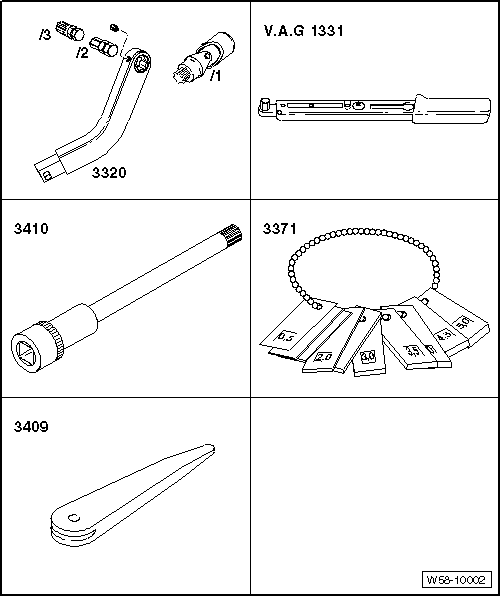
Removal wedge -3409- |
| – |
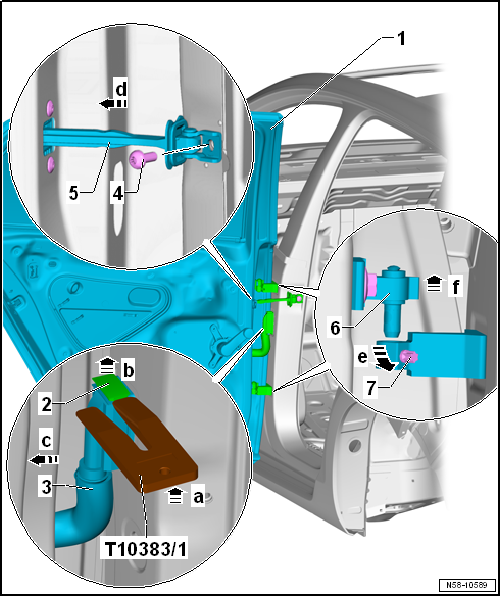
Press wedge -T10383/1- between bellows -3-
and locking mechanism -2--arrow a-. |
| – |
Push locking mechanism upwards -2- with
wedge -T10383/1--arrow b- and separate
electrical connector -3- from coupling
station -arrow c-. |
| – |
If fitted, remove covers of bolts -7-. |
| – |
Loosen bolts -7- at hinges
-arrow e-, but do not remove them. |
| – |
Unscrew bolt -4- for door retaining
strap -6-. |
| – |
Push door retaining strip -6- inwards
-arrow d-. |
| – |
Lift front door -1- with upper parts of
hinges -6- upwards
-arrow f- out of lower parts of hinges. |
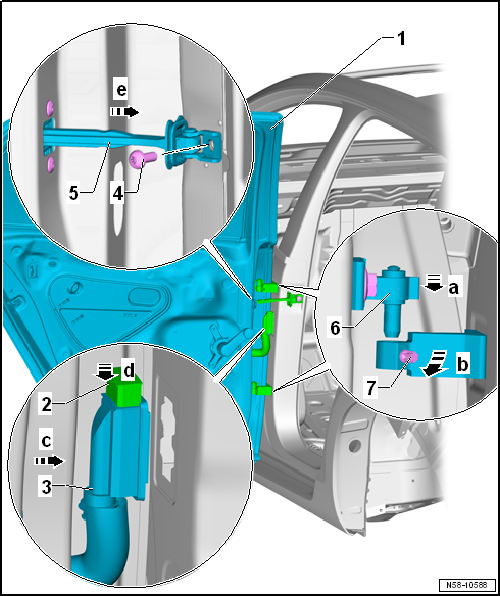
| Install in reverse order of removal. To this end, the following
should be observed: |
 Caution Caution
| Prior to installing the rear door, the door
retaining strap must be folded towards the inside of the vehicle
in order to avoid damage to the paintwork. |
|
Note
| After installation of the rear door, the hinge arms must be flush
one above the other. |
| – |
Adjust rear door -1-
→ Chapter. |
| – |
Observe front door shut lines -1-
→ Rep. gr.00. |
| |
→ Chapter „Assembly overview - door“ |
Note
Only the left side is shown. The right side is similar.
After renewal of B-pillar, the specified torque for bolts
-2 and 5- as well as for
...
Special tools and workshop equipment
required
Door alignment tool -3320-
Universal joint for 3320 -3 ...
Other materials:
Painting parking aid sensor
To avoid malfunctions in the parking aid sensor, always
observe the following when painting:
Painting new parts
Maximum layer thickness 125 µm; a measurement of layer depth
is absolutely essential following ...
Assembly overview - rear brakes
Assembly overview - rear brakes:
Note
Use the brake filling and bleeding equipment -VAS 5234- to
draw off brake fluid from the brake fluid reservoir.
Before removing a brake caliper or disconnecting ...
Noises from shock absorbers
Shock absorbers are often replaced because of noises
(rumbling, etc.) experienced by the customer. Inspections on the
test rig and in the vehicle have shown that in approx. 70 % of
these cases there is no case for complaint. The replacement was
not justi ...
© 2016-2026 Copyright www.vwgolf.org


 Assembly overview - door
 Adjusting door