Volkswagen Golf Service & Repair Manual: Removing and installing bumper cover
| Volkswagen R GmbH, optional equipment, “R Line” and “R” |
 Note
| The removal and installation procedures for the bumper cover
may vary slightly, depending on vehicle model. |
| Special tools and workshop equipment
required |
|
|
|
|
|
|
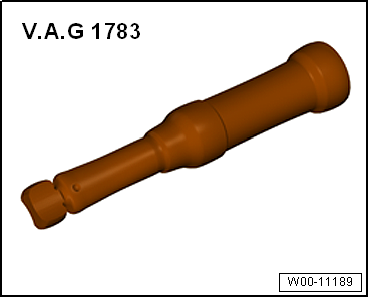
Torque wrench -V.A.G 1783- |
| – |
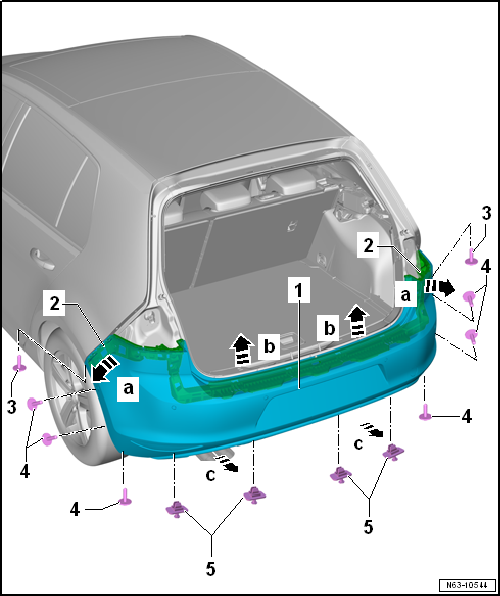
Remove tail lights in side panel
→ Electrical system; Rep. gr.94. |
| – |
Undo bolts -3- in wheel housing
(pointing upwards) on left and right. |
| – |
Remove bolts -4- on left and right
sides in area of wheel housing liner. |
| – |
Remove spreader rivets -5- from
underneath. |
| Further dismantling requires the assistance of a second mechanic. |
| – |
Pull bumper cover -1- out of guide
fasteners on left and right -2- of side
panel -arrows a-. |
| – |
Release bumper cover -1- upwards from
fasteners -arrows b-. |
| – |
Pull bumper cover -1- off vehicle in
parallel movement -arrows c-. |
| – |
Unplug connectors to electrical components (where installed). |
| General information and work instructions for the parking aid can be
found in
→ Electrical system; Rep. gr.94. |
| General information and work instructions for the Park Assist system
can be found in
→ Electrical system; Rep. gr.94. |
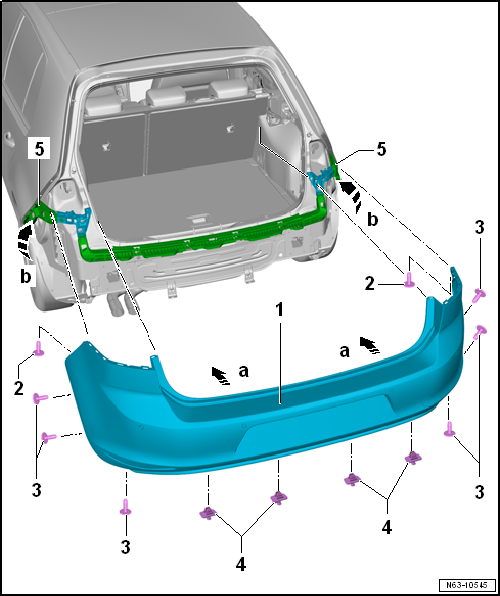
| Further installation requires the assistance of a second mechanic. |
| – |
If present, connect connectors of electrical components. |
| – |
Guide bumper cover -1- onto vehicle in
a parallel movement -arrows a-. |
| – |
Press bumper cover -1- onto guides on
left and right -5- of side panel until they
engage with each other -arrow b-. |
| – |
Observe gaps/shut lines
→ Rep. gr.00. |
| – |
Clip in spreader rivets -4- from
underneath. |
| – |
Install tail lights in side panel
→ Electrical system; Rep. gr.94. |
| – |
Additional work step for models GTI and GTD
→ Anchor. |
| – |
Additional work step for models “R Line” and “R”
→ Chapter |
| |
→ Chapter „Assembly overview - bumper cover“ |
| Removing and installing adapter |
|
|
|
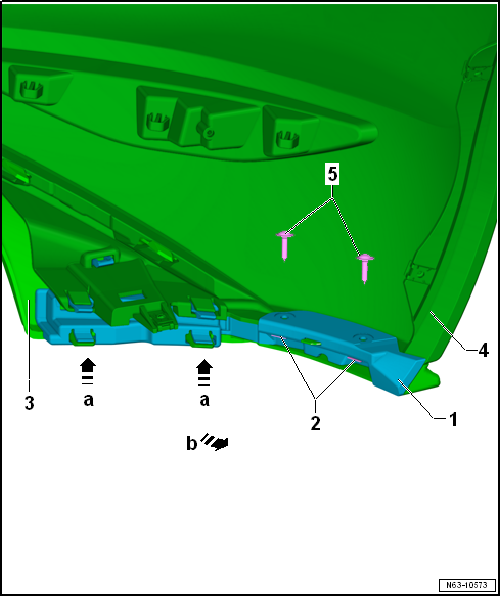
| – |
Release fasteners -arrows a-, and pull
adapter -1- off spoiler
-3- and bumper cover
-4--arrow b-. |
| – |
Push adapter -1- onto bumper cover
-4- and engage it in spoiler
-3-. |
| |
Bumper cover GTI/GTD
→ Chapter. |
Volkswagen R GmbH, optional equipment, “R Line” and “R”
1 -
Impact bar
Different versions, al ...
Volkswagen R GmbH, optional equipment, “R Line” and “R”
Removing
...
Other materials:
Deactivating APP function of wiper motor
The windscreen wiper system is equipped with an APP function
(alternating park position).
With the APP function, the wiper is moved up slightly once
it has reached the lowest position. This occurs every second
time the wiper system is sw ...
Stowage compartment in the front centre console
Fig. 111 In the centre console: stowage
compartment
First read and observe the introductory information
and safety warnings To open, briefly press the cover of the stowage
compartment (arrow).
To close, push the stowage compartment cover down as far as it will go.
The stowage co ...
Removing and installing front air distribution flap control motor -V426-,
RHD vehicles
Special tools and workshop equipment
required
Vehicle diagnostic tester
First carry out the following work:
–
Switch off all electrical consumers.
–
...
© 2016-2026 Copyright www.vwgolf.org


 Assembly overview - impact bar
 Removing and installing impact bar