
Volkswagen Golf Owners Manual: Display and indicator lamps
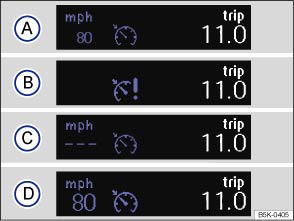
Fig. 160 Instrument cluster display: cruise control (CCS) status display
 First read and observe the introductory information
and safety warnings
First read and observe the introductory information
and safety warnings CCS displays
Status :
 CCS switched off temporarily. The stored
speed is shown in small numbers or displayed in a darker shade.
CCS switched off temporarily. The stored
speed is shown in small numbers or displayed in a darker shade.  System fault. Proceed to a qualified workshop.
 CCS switched on. Speed memory is empty.
 CCS is active. Stored speed in large
figures.
CCS is active. Stored speed in large
figures.
Indicator lamp
| Lit up | Possible cause |
|---|---|
 |
CCS or the speed limiter is controlling the speed. |
Several warning and indicator lamps will light up briefly as a functional check when the ignition is switched on. They will switch off after a few seconds.

 WARNING
- Never ignore any illuminated warning lamps or text messages.

 NOTICE

 Introduction
This chapter contains information on the following subjects:
→ Display and indicator lamps
→ Operating the cruise control system (CCS)
The cruise control system (CCS) helps ...
 Operating the cruise control system (CCS)
Fig. 161 On the left of the steering column:
switch and buttons for operating the CCS
Fig. 162 Left-hand side of the multifunction
steering wheel: buttons for operating the CCS
First read and ...
Other materials:
Removing and installing retainer for digital sound package control unit
-J525-
Special tools and workshop equipment
required
Torque wrench -V.A.G 1783-
Removing
–
Removing digital sound package control unit -J525-
&# ...
Introduction
This chapter contains information on the following subjects:
→ Opening or closing the electric panorama sliding/tilting roof
→ Function of the electric panorama sliding/tilting roof
→ The roll-back function for the electric panorama sliding/tilting roof
Ad ...
Assembly overview - fixed rear door window
1 -
Fixed door window
Removing and installing
→ Chapter
2 -
Seal
Part of window
3 -
Bolt
Qty. 2
6 Nm
4 -
Cover
Qty. 2
5 ...
