
Volkswagen Golf Service & Repair Manual: Overview of fitting locations - storage compartments/covers
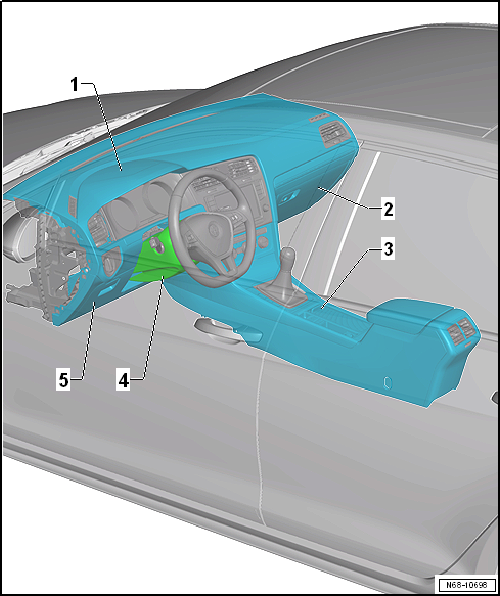
| 1 - | Dash panel |
- Assembly overview → Chapter
| 2 - | Glove compartment |
- Assembly overview → Chapter
| 3 - | Centre console |
- Assembly overview → Chapter
| 4 - | Steering column trim |
- Assembly overview → Chapter
- Removing and installing upper steering column trim → Chapter
- Removing and installing lower steering column trim → Chapter
| 5 - | Driver side dash panel cover |
- Assembly overview → Chapter

 Assembly overview - driver side footwell cover
1 -
Driver side footwell cover
Removing and installing
→ Chapter
2 -
Bracket
3 -
Bolt
1.5& ...
Other materials:
The roll-back function for the electric panorama sliding/tilting roof
First read and observe the introductory information
and safety warnings The roll-back function can reduce the risk of crush injuries
when closing the electric panorama sliding/tilting roof . If the electric panorama
sliding/tilting roof cannot close because it is stiff or obstructed, it w ...
Function and operation by the user
Fig. 179 In the instrument cluster display:
Driver Alert System
First read and observe the introductory information
and safety warnings The Driver Alert System determines the driving behaviour
at the beginning of a journey and uses it to evaluate the tiredness of the driver.
This is comp ...
Removing and installing Hall sender 3 -G300-
Removing
–
Release hose clips -1- and
-2-, and remove air pipe.
–
Disconnect electrical connector -1-.
...
