
Volkswagen Golf Owners Manual: Function
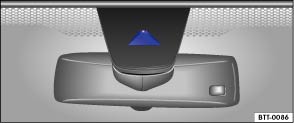
Fig. 177 Windscreen: lane departure warning system camera window
 First read and observe the introductory information
and safety warnings
First read and observe the introductory information
and safety warnings Using a camera in the windscreen, the lane departure warning system (Lane Assist) detects lines on the road that may mark the lane boundary. If your vehicle approaches a recognised marking line unintentionally, the system will warn the driver with a corrective steering intervention. The corrective steering intervention can be overridden by the driver at any time.
When adaptive lane guidance is active , Lane Assist does not just provide assistance when the vehicle is at risk of leaving the lane. The function provides continuous assistance while driving if the lane is demarcated by 2 markings to the left and right of the vehicle.
The system adopts the preferred position within the lane in which the vehicle is travelling. For example, if the vehicle is being driven slightly off-centre in the lane, the system will learn to adopt the new position within a short period of time.
No steering intervention will occur if the turn signal is switched on as Lane Assist will assume that the lane change is deliberate.
Steering wheel vibration
The following (very rare) situations will cause the steering wheel to vibrate and demand active steering intervention by the driver:
- If the corrective steering intervention is not sufficient to keep the vehicle in its lane.
- If the system no longer detects a lane during a strong corrective steering intervention.
Activating or deactivating Lane Assist
- Using the button for driver assist systems, select the corresponding menu option .
Automatic switch-off: Lane Assist can switch itself off automatically if there is a system fault. The indicator lamp goes out.
Activating or deactivating adaptive lane guidance
Adaptive lane guidance can be activated or deactivated using the


 button and the
  and
Driver assistance function buttons in the infotainment system .
and
Driver assistance function buttons in the infotainment system .
Lane Assist is not active (the indicator lamp lights up yellow)
- If the vehicle speed is less than approximately 65 km/h (40 mph).
- If Lane Assist cannot detect the markings for the lane in which the vehicle is travelling. For example due to road works or in snow, dirt, wet weather or oncoming lights.
- The radius of a bend is too small.
- If there is no lane marking.
- If the distance to the nearest lane marking is too great.
- If the ESC is in Sport mode or is switched off.
- If the system does not detect any clear steering activity by the driver over an extended period.
- Temporarily if the driving style is very dynamic.
- If the turn signal is switched on.

Before starting a journey, check that the camera window is not covered .
The camera window must be kept clean at all times.
 Display and indicator lamps
Fig. 176 In the instrument cluster display:
lane departure warning system displays.
First read and observe the introductory information
and safety warnings Displays
Display fields :
L ...
 Switch off the lane departure warning system in the following situations
First read and observe the introductory information
and safety warnings The lane departure warning system (Lane Assist) should
be switched off due to system limitations in the following situatio ...
Other materials:
Assembly overview - sill panel moulding
Note
The illustration shows the sill panel moulding on the left side. The
right-hand side is similar (mirror image of left-hand side).
I: sill panel moulding, 4-door model
II: sill panel moulding, 2-door model
1 -
Sill ...
Assembly overview - control units, RHD vehicles
1 -
Bracket
For onboard supply control unit -J519-
Removing and installing
→ Chapter
2 -
Onboard supply control unit -J519-
Removing and installing
→ Chapter
...
Perform service test
Note
The print-out may vary depending on software version.
Observe the
→ operating manual of the battery tester with printerVAS 6161.
WARNING
...
