Volkswagen Golf Service & Repair Manual: Assembly overview - selector mechanism, manufacturer ZF
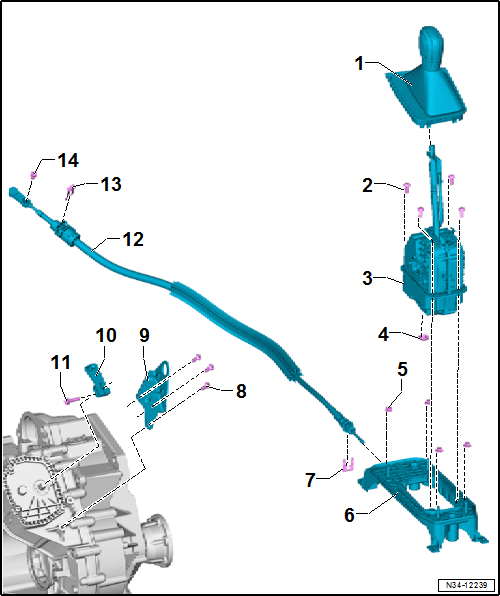
| 1 - |
Handle with selector cover |
| Do not remove handle without reason. Emergency release from position
P
→ Chapter |
| Removing and installing
→ Chapter |
| Moving push button to installation position
→ Chapter |
| With integrated selector lever sensor control unit -J587- with
selector lever -E313-, Tiptronic switch -F189-, switch for selector
lever locked in P -F319- and selector lever lock solenoid -N110- |
| Removing and installing
→ Chapter. |
| 9 - |
Cable support bracket |
| 10 - |
Gearbox selector lever |
| 12 - |
Selector lever cable |
| Removing and installing
→ Chapter |
| Checking and adjusting
→ Chapter |
| Adjuster screw for selector lever cable |
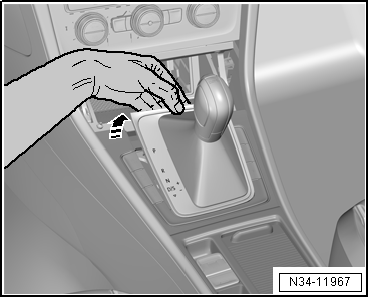
Emergency release from position P, Golf 2013 ►, Golf Estate 2014
| – |
Depress brake pedal or set handbrake. |
| – |
Open lid of storage compartment. |
|
|
|
| – |
Grasp under the cover with one hand and unclip selector
cover by pulling it upwards. |
|
|
|
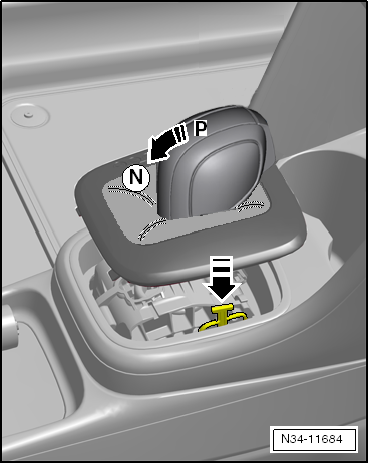
| – |
Push selector cover to one side, press onto the yellow
plastic component and hold it in this position. |
| Selector lever can now be moved from position
»P«. |
|
|
|
Removing and installing selector lever handle, Golf 2013 ►, Golf Estate
2014 ►, Passat 2015 ►, Passat Estate 2015 ►
| Special tools and workshop equipment
required |
|
|
|
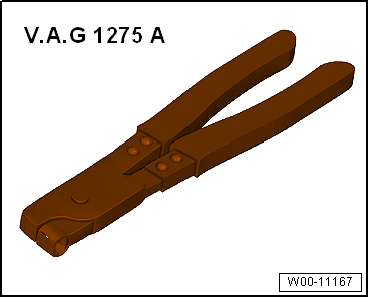
| Hose clip pliers -V.A.G 1275 A- |
| Handle is removed together with selector cover. |
| – |
Shift selector lever to position “D”. |
|
|
|
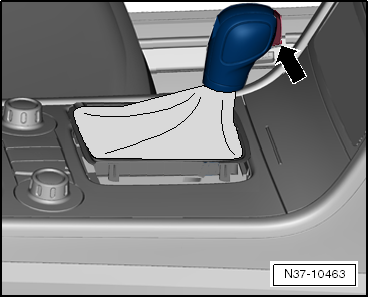
| The push button -arrow- does
not need to be pulled out by hand. Push button engages
automatically in installation position when handle is pulled
off. |
| – |
Open lid of storage compartment. |
|
|
|
| – |
Grasp below cover with one hand and pull it upwards to
unclip it. |
| – |
Disconnect electrical connectors. |
|
|
|
| It is possible for the push button in the handle to be
pressed. Never install a handle with the push button pressed in. |
| Move push button to installation position
→ Chapter. |
|
|
|
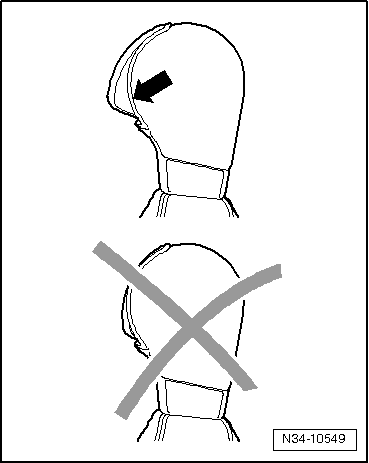
| New handle is supplied with installation guard. Do not
remove guard until just before installing. To remove, pull out
in direction of -arrow-. |
| – |
Push handle fully onto selector lever and lock. |
| – |
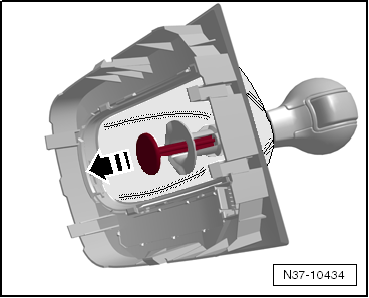
Push sleeve downwards to lock. |
|
|
|
| – |
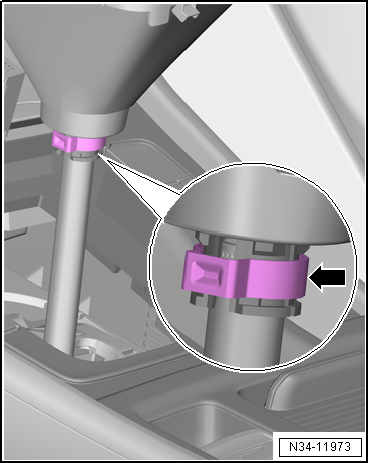
Push on handle with new clamp -arrow-
onto stop. |
| – |
Secure clip with hose clip pliers -V.A.G 1275 A-. |
| – |
Connect electrical connector. |
| – |
Push the push button after installing it. |
 Note Note
| If not installed correctly, push button remains inserted in
handle after being pressed. If this happens, remove handle again
and move push button to installation position again
→ Chapter. Then, fit the handle again. |
| – |
Clip cover in position. |
|
|
|
Assembly overview - selector mechanism ...
Special tools and workshop equipment
required
Release tool -T10534-
If the push- ...
Other materials:
Safety precautions when working on cooling system
Risk of scalding due to hot coolant
The cooling system is under pressure when the engine is hot. Hot
steam/hot coolant can escape - risk of scalding.
–
Wear protective gloves.
–
Wear eye protection.
–
...
Removing and installing mirror cover
Note
Removal and installation are described only for the left mirror
cover. The right side is similar.
Removing
–
Remove mirror glass
→ Chapter.
–
Release locking hook ...
Mobile telephone preparation, Bluetooth hands-free system
Bluetooth hands-free system is integrated in control unit 1
for information electronics -J794-.
Connection to mobile telephone -R54- is established via
Bluetooth.
Aerial for Bluetooth -R152- is integrated into control un ...
© 2016-2026 Copyright www.vwgolf.org


 Selector mechanism
 Moving push button to installation position in the handle