
Volkswagen Golf Owners Manual: Displays
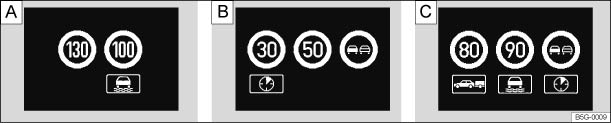
Fig. 178 In the instrument cluster display: examples of recognised speed limits or overtaking restrictions with accompanying additional signs
 First read and observe the introductory information
and safety warnings
First read and observe the introductory information
and safety warnings | Traffic sign recognition texts | Cause and solution |
|---|---|
| No traffic signs detected | The system is in the initialisation phase. OR: the camera has not detected any regulatory or warning signs. |
| Error: traffic sign recognition | System fault. Go to a qualified workshop and have the system checked. |
| Traffic sign recognition: clean the windscreen! | The area of the windscreen in the vicinity of the camera is dirty. Clean the windscreen. |
| Traffic sign recognition: currently restricted. | No data transmission from the navigation unit. Check if valid map data is loaded on the navigation unit. OR: the vehicle is located in an area that is not covered by the map stored on the navigation unit. |
| No data available | Traffic sign recognition is not supported in the country in which you are currently travelling. |

 WARNING
- Never ignore any text messages.
- Stop the vehicle as soon as possible and when safe to do so.

 NOTICE
 Introduction
This chapter contains information on the following subjects:
→ Displays
→ Operation
The traffic sign recognition system can help the driver check the speed limits
or over ...
 Operation
First read and observe the introductory information
and safety warnings The traffic sign recognition system is supported in various
countries . Please remember this when travelling abroad.
...
Other materials:
Removing and installing headlight washer system pump -V11-,
»R«
Special tools and workshop equipment
required
Drip tray
Removing
–
Remove washer fluid reservoir
→ Chapter.
...
Belt height adjuster
Fig. 68 Next to the front seats: belt height
adjuster
First read and observe the introductory information
and safety warnings The seat belt height adjusters for the front seats can
be used to adjust the position of the seat belt on the shoulder so that it can be
fastened properly:
P ...
Removing and installing reversing camera -R189-
Reversing camera and swivel motor are each installed in
individual housings together in swivel badge of rear lid. To
remove camera housing, remove first both components together
with swivel badge from rear lid. Afterwards, camera housing
together with sw ...
