Volkswagen Golf Service & Repair Manual: Battery tester with printer -VAS 6161-
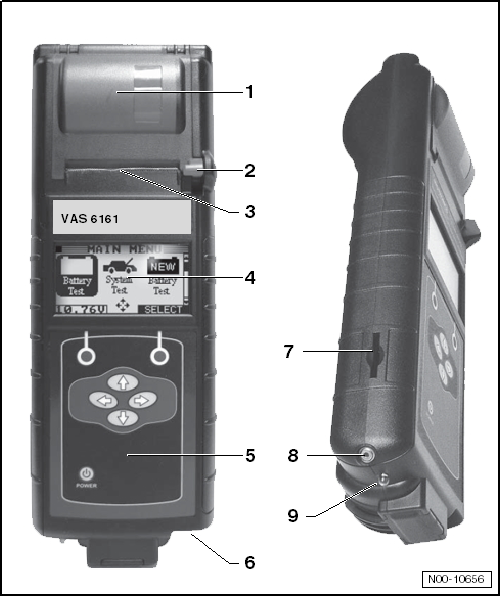
| Description of battery tester with
printer -VAS 6161- |
| 2 - |
Operating lever for paper compartment |
| 4 - |
LCD screen with main menu |
| 5 - |
Control panel with On/Off button |
| 6 - |
Connection for battery test cable |
| 8 - |
Infrared temperature sensor |
| 9 - |
Data transmitter for PC |
|
|
|
WARNING
Danger of injury! Observe warning notices and safety
regulations
→ Chapter!
...
WARNING
Danger of injury! Observe warning notices and safety
regulations
→ Chapter!
...
Other materials:
Introduction
This chapter contains information on the following subjects:
→ Warning lamp
→ Childproof lock
Additional information and warnings:
Vehicle key set
Instruments
Central locking system
Manual opening and closing
WARNING
Any door ...
Assembly overview - three-point seat belt, estate, without belt tensioner
1 -
Belt guide
Removing and installing
→ Chapter
2 -
Belt inertia reel
Removing and installing
→ Chapter
3 -
Bolt
If removed due to an accident with seat belt fastened, r ...
General safety regulations
To prevent personal injury and material damage to the
vehicle, observe the following:
WARNING
Risk of injury and accident by accidental engagement
of gear while engine is running.
...
© 2016-2026 Copyright www.vwgolf.org


 Note
Note WARNING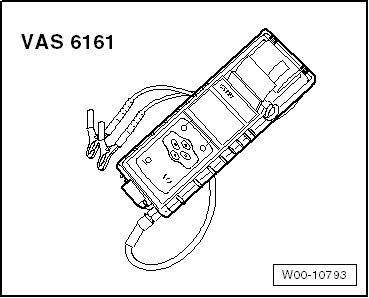
 Checking colour indicator, “2-colour”
 Perform battery test with battery tester with printer -VAS 6161-.