Volkswagen Golf Service & Repair Manual: Removing and installing upper steering column trim
| Special tools and workshop equipment
required |
|
|
|
| |
|
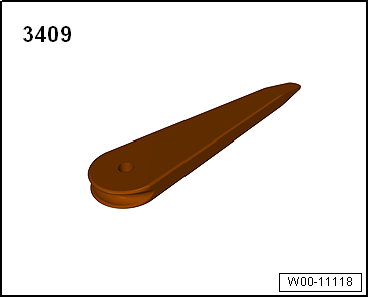
Removal wedge -3409- |
| – |
Release locking lever of steering wheel positioner. |
| – |
Pull out steering wheel completely, push it down and fix it
in place. |
| – |
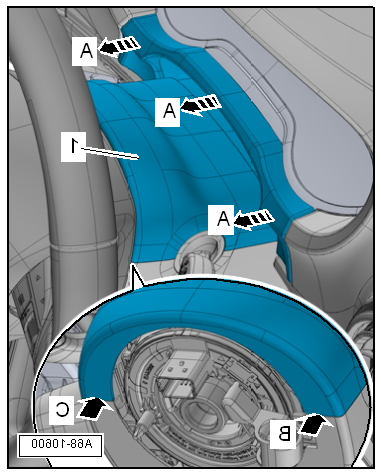
Release gap cover for dash panel insert from mountings on
dash panel insert -arrows A- using
removal wedge -3409-. |
| – |
Release upper steering column trim -1-
from mountings of lower steering column trim
-arrow B- and
-arrow C-. To do this, turn steering wheel accordingly. |
| – |
Detach upper steering column trim from lower steering column
trim and remove it together with gap cover for dash panel
insert. |
 Note Note
| Before installing, check all fasteners for damage and renew
if necessary. |
| Installation is carried out in reverse order. |
|
|
|
Special tools and workshop equipment
required
Removal wedge -3409-
...
Special tools and workshop equipment
required
Torque wrench -V.A.G 1783-
...
Other materials:
Nuts and bolts
Loosen and tighten bolts and securing nuts for covers and
housings diagonally.
Avoid canting particularly sensitive parts such as comtrol
motor with control unit. Loosen and tighten them diagonally in
stages.
...
Removing toothed belt from camshafts, engine code CHPA, CZDA
Special tools and workshop equipment required
Torque wrench -VAS 6583-
Counterhold -T10172- with adapter -T10172/1-
Locking pin -T10340-
Counterhold -T10475-
Special wrench, 30 mm -T10499-
...
Assembly overview - front side airbag
1 -
Backrest frame
2 -
Hook
For attaching side airbag to backrest frame
3 -
Front side airbag
Driver side: with side airbag igniter on driver side -N199-
Front passenger side: with side airbag igniter o ...
© 2016-2026 Copyright www.vwgolf.org


 Removing and installing dash panel insert trim
 Removing and installing lower steering column trim