
Volkswagen Golf Service & Repair Manual: Removing and installing short centre underbody cover
 Note
Note| The removal and installation procedures may have to be modified slightly depending on engine fitted. |
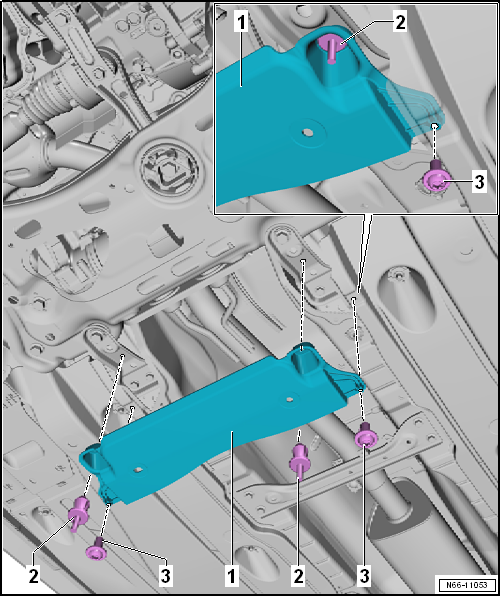
| Removing |
| Unclip spreader river -2- and remove centre underbody panels. |
| – | Remove bolt -3-. |
| Installing |
| Installation is carried out in reverse order. |
| Specified torques |
| Bolt → Item |
 Removing and installing centre underbody covers
Note
The removal and installation procedures may have to be modified
slightly depending on engine fitted.
Removing
Unclip spreader river -2- and remove
...
 Removing and installing centre underbody cover – e-Golf
Removing
–
Remove bolts -2-.
–
Unscrew nuts -3-.
–
Remove underbody cover -1-.
Installing
...
Other materials:
Removing and installing evacuating and charging valves on low and
high-pressure side
Special tools and workshop equipment
required
Torque wrench -V.A.G 1783
Ratchet insert 1/4 inch -VAS 6234
...
Stone chip tester -VAS 5102A
Designation:
Stone chip tester -VAS 5102A-
Product description
The stone chip tester -VAS 5102A- has been developed by VW
AG and allows the user to recognise whether paint damage is the
resul ...
Removing and installing refrigerant shut-off valve for high-voltage battery
heat exchanger -N542
Removing
–
Observe safety precautions
→ Chapter „Safety precautions when handling refrigerants“.
–
Comply with notes
→ Chapter „Working on refrigerant circuit“.
...
