
Volkswagen Golf Service & Repair Manual: Removing and installing emblems at rear
 Note
Note
| The emblem cannot be removed without damage. |
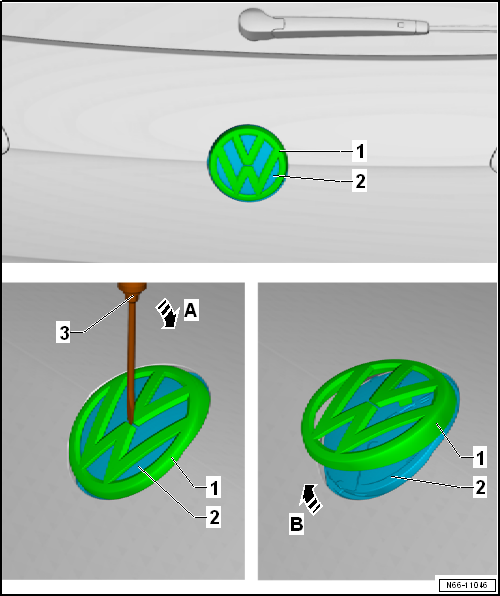
| Removing |
| – | Use a screwdriver -3- to carefully lever manufacturer emblem -1- off swivel badge -2- in -direction of arrow A-. |
| Installing |
| – | Press manufacturer emblem -1- onto swivel badge -2- until it engages audibly. |
 Removing and installing emblem with model designation, “R”
Special tools and workshop equipment
required
Torque wrench -V.A.G 1783-
...

Other materials:
Comments concerning test print out
1 -
Check type.
2 -
Battery test result
3 -
Measured voltage
4 -
Measured cold start value of battery.
5 -
...
Removing and installing centre console retainer, securing bracket and
insulation for selector mechanism, e-Golf only
Special tools and workshop equipment
required
Torque wrench -V.A.G 1783-
Removing
Front bracket
Note
Removal and ...
Removing and installing sliding sunroof frame
Special tools and workshop equipment
required
Double cartridge gun -VAS 5237-
Electric cutter -V.A.G 1561A-
...
