
Volkswagen Golf Service & Repair Manual: Removing and installing driver side footwell cover
|
|
|
| Removing |
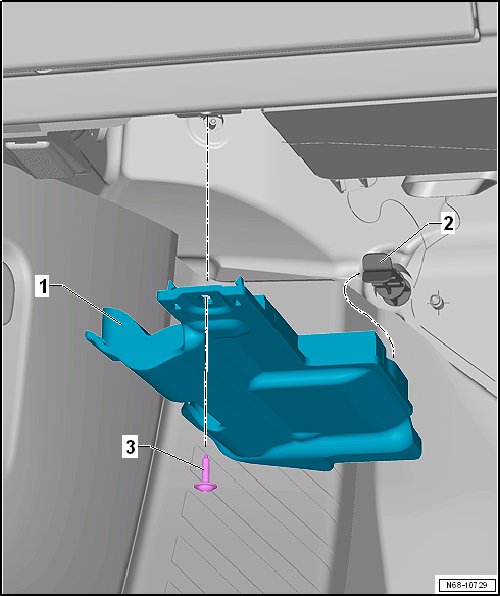
| – | Remove bolt -3-. |
| – | Pull driver side footwell cover -1- out of retainer -2- and remove it. |
 Note Note
|
 Assembly overview - storage compartment in roof headliner
1 -
Storage compartment
Removing and installing
→ Chapter
2 -
Cover
3 -
Bolt
Qty. 4
1.5& ...
 Removing and installing driver side storage compartment
Removing
–
Open driver side storage compartment -1-
in -direction of arrow-.
–
Release driver side storage compartment -1-
from u ...
Other materials:
Safety precautions when working on subframe
It is not permitted to carry out welding and straightening
operations on load-bearing or wheel-guiding suspension
components.
Always renew corroded nuts and bolts.
Bonded rubber bushes can be twisted only to ...
Removing and installing rear seat backrest
Special tools and workshop equipment
required
Torque wrench -V.A.G 1331
Removing
–
Remove bench seat
→ Ch ...
Dismantling and assembling burner unit
Dismantling
–
Remove auxiliary heater
→ Chapter.
–
Dismantle auxiliary heater
→ Chapter.
–
De ...
