
Volkswagen Golf Owners Manual: Display and warning and indicator lamp
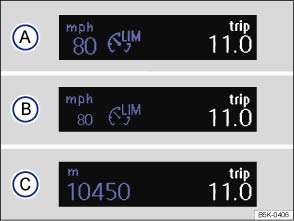
Fig. 163 In the instrument cluster display: speed limiter status displays
 First read and observe the introductory information
and safety warnings
First read and observe the introductory information
and safety warnings Speed limiter displays
Status :
 The speed limiter is active. The last
stored speed is displayed in large digits.
The speed limiter is active. The last
stored speed is displayed in large digits.  The speed limiter is inactive. The last
stored speed is shown in small digits or the display is darkened.
The speed limiter is inactive. The last
stored speed is shown in small digits or the display is darkened.  The speed limiter is switched off. The
total mileage is displayed.
The speed limiter is switched off. The
total mileage is displayed.
Warning and indicator lamp
| Lights up or flashes | Possible cause |
|---|---|
 |
Lit up: the speed limiter is switched on, active. |
| Flashing: the set speed of the speed limiter has been exceeded. |
Several warning and indicator lamps will light up briefly as a functional check when the ignition is switched on. They will switch off after a few seconds.

 WARNING
- Never ignore any illuminated warning lamps or text messages.

 NOTICE

 Introduction
This chapter contains information on the following subjects:
→ Display and warning and indicator lamp
→ Operating the speed limiter
The speed limiter helps the driver not t ...
 Operating the speed limiter
Fig. 164 Left-hand side of the steering
column: switch and buttons for operating the speed limiter
Fig. 165 Left-hand side of the multifunction
steering wheel: buttons for operating the speed li ...
Other materials:
Overview of fitting locations – lights in dash panel
Note
The illustration shows fitting locations for LHD vehicles. Fitting
locations for RHD vehicles are similar.
1 -
Front passenger side airbag deactivated warning lamp -K145-
The front passenger side airbag deactivated warning ...
Vibration control system
Using the vibration control system -VAS 6230 A- you can
perform more functions than just stationary balancing.
A special feature of this system is the testing of the
radial force of the wheel and tyre while rolling.
A ro ...
Removing and installing rear axle, torsion beam axle
Special tools and workshop equipment
required
Torque wrench -V.A.G 1332-
Engine and gearbox jack -V.A.G 1383 A-
...
