
Volkswagen Golf Service & Repair Manual: Assembly overview - rear door trim
 Note
Note| The assembly overview is shown for the rear door trim on driver side. The assembly overview for the front passenger side is analogous. |
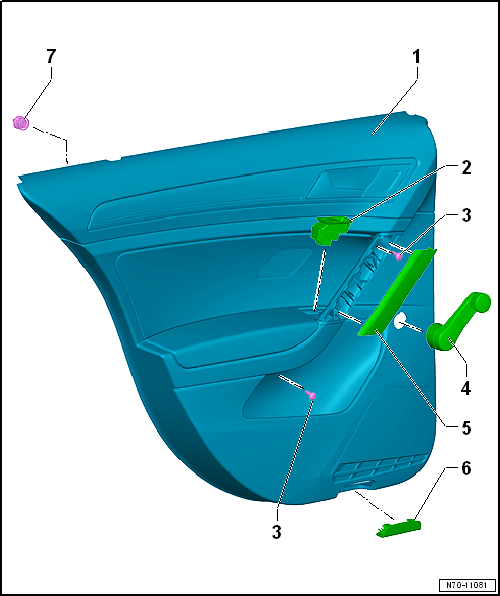
| 1 - | Door trim |
- Removing and installing → Chapter
| 2 - | Rear driver side window regulator button -E711- |
- Only for vehicles with window regulator.
- Overview of fitting locations → Electrical system; Rep. gr.96
| 3 - | Bolt |
- Qty. 2
- 4.5 Nm
| 4 - | Window winder |
- Only for vehicles with manual window regulator
- Removing and installing → General body repairs, exterior; Rep. gr.58
| 5 - | Upper part of handle recess |
| 6 - | Reflector |
- Overview of fitting locations → Electrical system; Rep. gr.96
| 7 - | Clip |
- Qty. 6
- Insert into trim
- Renew any damaged or deformed clips
 Rear door trims
...
 Removing and installing rear door trim
Note
Removal and installation is described for the rear door trim
on driver side. Follow same instructions for the front passenger
side as appropriate. ...
Other materials:
Adjusting assembly mountings
Procedure
–
Remove battery tray
→ Electrical system; Rep. gr.27.
–
Release hose clips -1- and
-2-, and remove air pipe.
...
Removing and installing bulb for front interior light -W1- with incandescent
bulbs
Special tools and workshop equipment
required
Removal wedge -3409-
Note
The light used for the front interior light -WX1- and the
light front passenger reading ...
Installing engine
Procedure
Engine/gearbox assembly secured to engine support T10497.
Note
Renew bolts that are tightened with specified tightening
angle.
Renew self-locking nuts and bolts ...
