
Volkswagen Golf Service & Repair Manual: Assembly overview - guides for bumper cover
|
 Note
Note| Different versions. For allocation see → Electronic Parts Catalogue “ETKA”. |
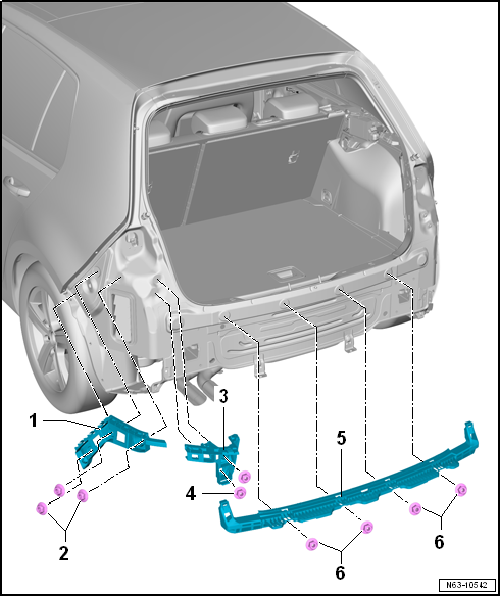
| 1 - | Guide bracket |
- Left and right
| 2 - | Hexagon nut |
- Qty. 3 on each side
- 3.5 Nm
| 3 - | Guide bracket |
- For tail light on left and right
| 4 - | Hexagon nut |
- Qty. 2 on each side
- 3.5 Nm
| 5 - | Centre guide profile |
| 6 - | Hexagon nut |
- Qty. 4
- 3.5 Nm
 Assembly overview - bumper cover
Note
Minor differences may be encountered in respect of bumper cover,
depending on vehicle model.
1 -
Bumper cover
Material PP/EPDM
Re ...
 Assembly overview - impact bar
Volkswagen R GmbH, optional equipment, “R Line” and “R”
1 -
Impact bar
Different versions, al ...
Other materials:
Mounting tyre, run-flat tyres, ultra-high performance tyres
Only trained personnel may perform any assembly work on
run-flat tyres and ultra-high-performance tyres.
If fitted, check tyre pressure sensor using vehicle
diagnostic tester, and renew it as necessary.
–
...
Assembly overview - emission control
1 -
Bolt
20 Nm
2 -
Bracket
Renew if damaged
3 -
Nut
Specified torque and tightening sequence
→ Fig.
4 -
Bolt
...
Removing and installing interface for entry and start authorisation system
-J965-
Note
When renewing the control unit, select
Renew function for the respective control unit in
Guided fault finding or
Guided functions mode
→ Vehicle
diagnostic tester.
The removal and insta ...
