
Volkswagen Golf Service & Repair Manual: Assembly overview - bumper cover
 Note
Note| Minor differences may be encountered in respect of bumper cover, depending on vehicle model. |
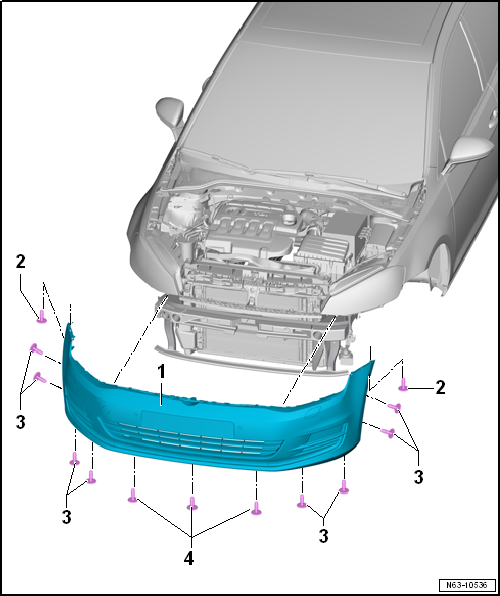
| 1 - | Bumper cover |
- Material PP/EPDM
- Removing and installing → Chapter.
| 2 - | Bolt |
- Left and right
- Points upwards
- 2.0 Nm
| 3 - | Bolt |
- Qty. 5 on each side
- Bolted to wheel housing liner
- 2.0 Nm
| 4 - | Bolt |
- Qty. 3
- Bolted to lock carrier.
- 2.0 Nm
 Front bumper
...
 Assembly overview - impact bar
1 -
Impact bar
2 -
Guide bracket
Left and right
3 -
Hexagon nut
Qty. 2 on each side
2.0 Nm
...
Other materials:
Contact surface cleaning set -VAS 6410-
Using contact surface cleaning set -VAS 6410-
The contact surface cleaning set -VAS 6410- allows optimal
repair quality to be achieved in the area of vehicle electrics.
The tools allow performing repair work in the area of the sensor
in wiring harnesses for t ...
Removing and installing fuel pump control unit -J538-
Special tools and workshop equipment
required
Removal wedge -3409-
Procedure:
Removing
–
Move front seats to foremost po ...
Overview - navigation system
The navigation system is available as Discover Media and
Discover Pro version with navigation.
The navigation function is integrated in control unit 1 for
information electronics -J794-.
For Discover Media version, the n ...
